

Incident Management for Businesses
Centralise requests, assign technicians, keep customers informed and track every case. A solution from Tecnidom Autonomy designed for technical service businesses that need structure, traceability and more professional customer support.
Every stage of an incident, without losing context along the way
The aim is not to create more bureaucracy. It is to ensure that customers, technicians and managers know what is happening and what comes next.
Fewer calls asking "What's happening with my request?" More information available to everyone.
Customers gain visibility and your team gains structure. Every request is centralised, assigned and traceable from opening to resolution.
Centralised incidents
Requests are no longer scattered across calls, emails, notes and messages. The entire process is managed in one place.
Informed customers
Customers can open a ticket, check its status and review its history without calling for updates.
Organised team
Every incident has an owner, status, priority, communications, attachments and a history.
A tailored process
We configure statuses, categories, teams, permissions and workflows to fit the way your business operates.
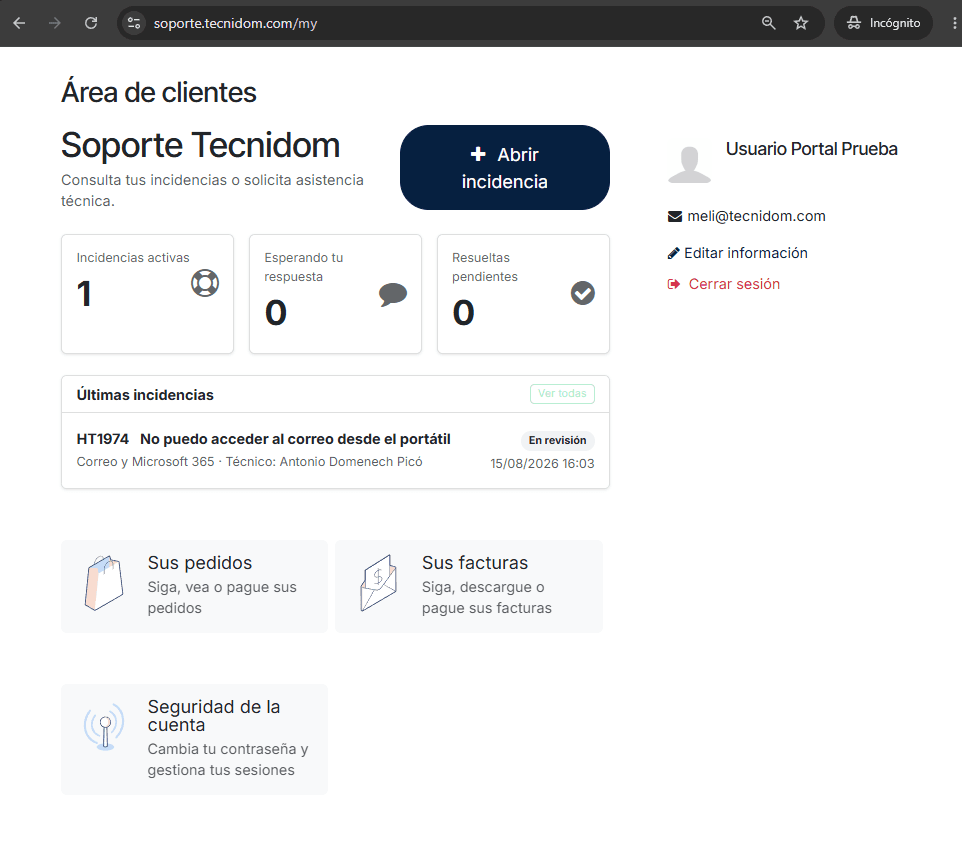
Incident tracking when the project includes a customer portal
Where a customer portal is included, customers can view active incidents, check their status and open the details of each case. They may also be able to open new incidents through the website if that feature is enabled.
- Open incidents via the website.
- Check status and assigned technician.
- Communication history.
- Attachments and additional information.
- Authenticated access for each customer.
See the entire workload at a glance
The team can quickly see which incidents are open, who owns them, when they were last updated and which deadlines need attention.
- Full list and filters.
- Visible statuses and priorities.
- Assigned technicians.
- Service-level targets and deadlines.
- Customers, projects, categories and labels.
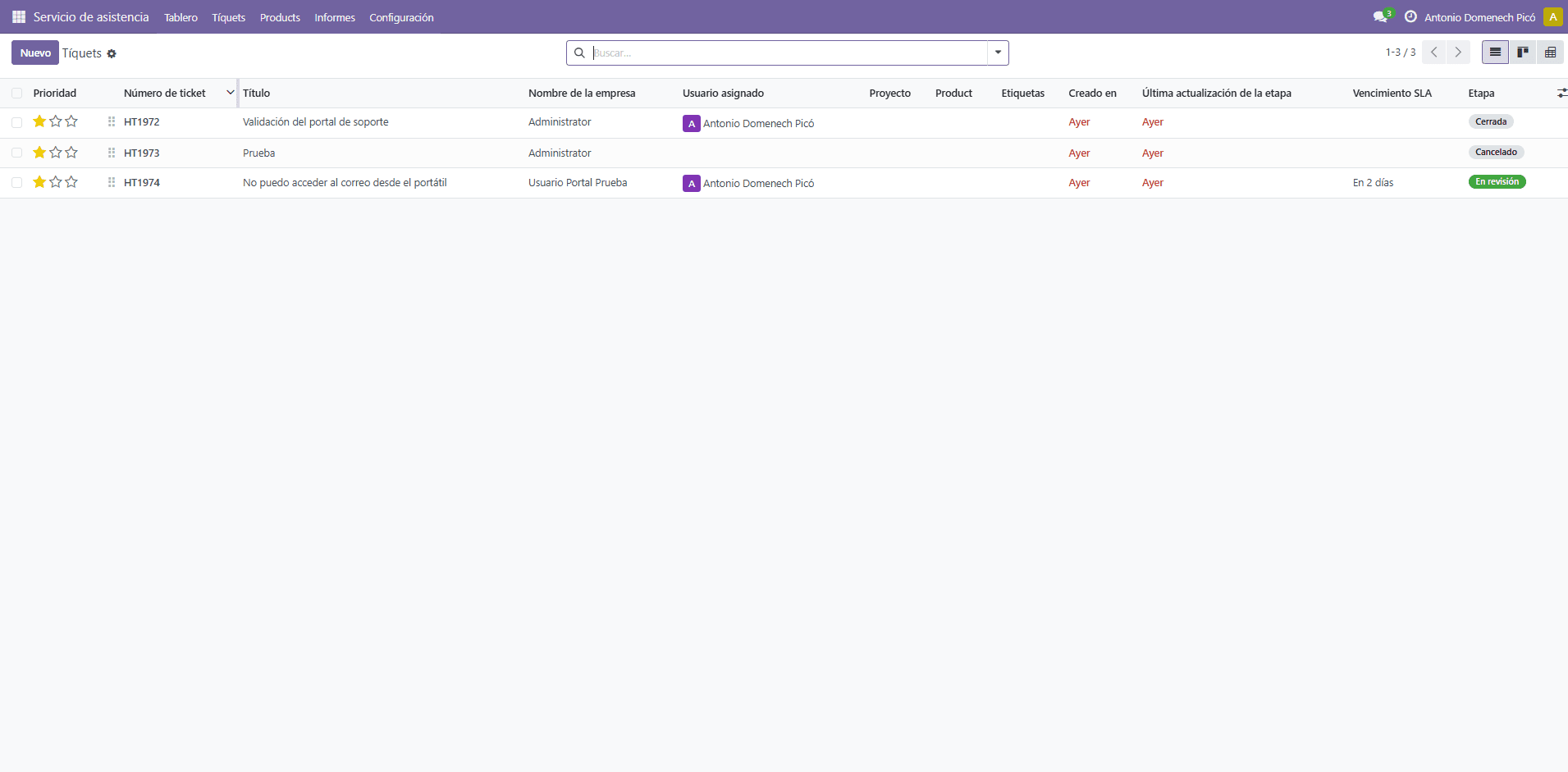
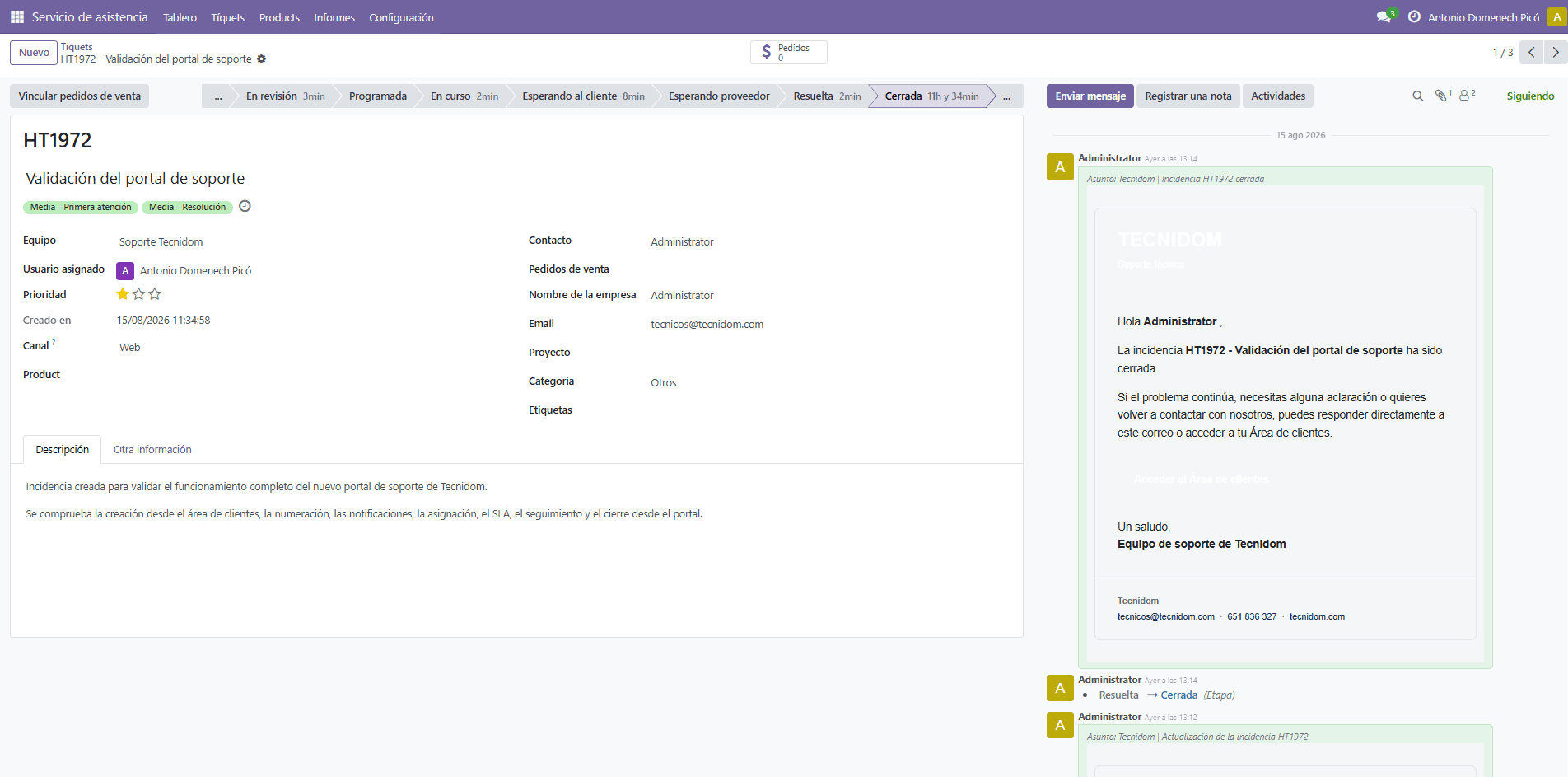
Every incident has an owner, context and a history
From the first report to closure, the record shows who was involved, what was communicated, changes in status and information provided by the customer.
- Responsible technician.
- Priority and target times.
- Category, customer and reporting channel.
- Communication history.
- Stage changes and follow-up.
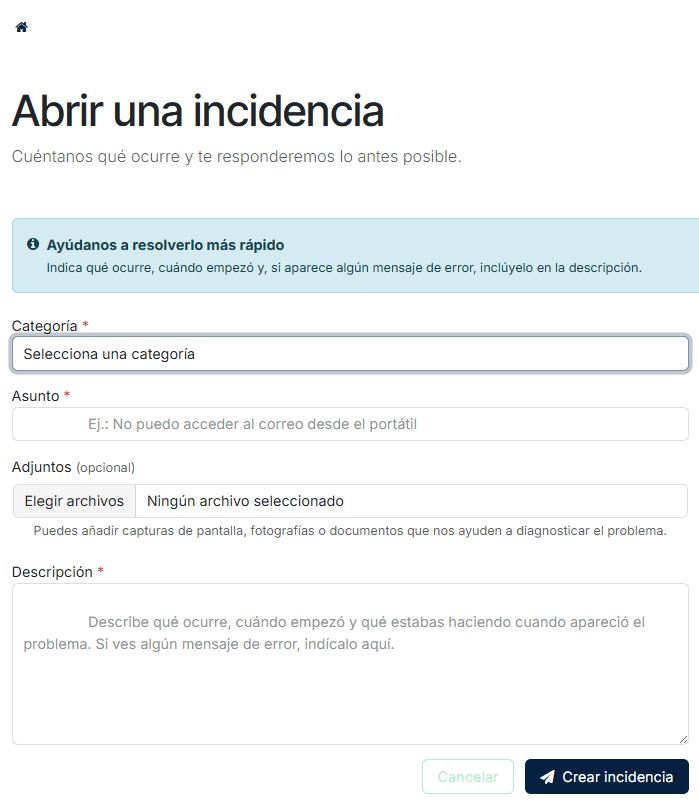
Customers can explain the issue clearly from the start
The form guides the customer to provide useful information: category, subject, description and files. Fewer follow-up questions and a better chance of starting work with the right context.
- Configurable categories.
- Detailed problem description.
- Screenshots, photographs and attached documents.
- A form tailored to each type of service.
Customers can review status and history whenever they need to
Information no longer depends on someone answering a call. The customer can see status, assigned technician, attachments and the conversation linked to the incident.
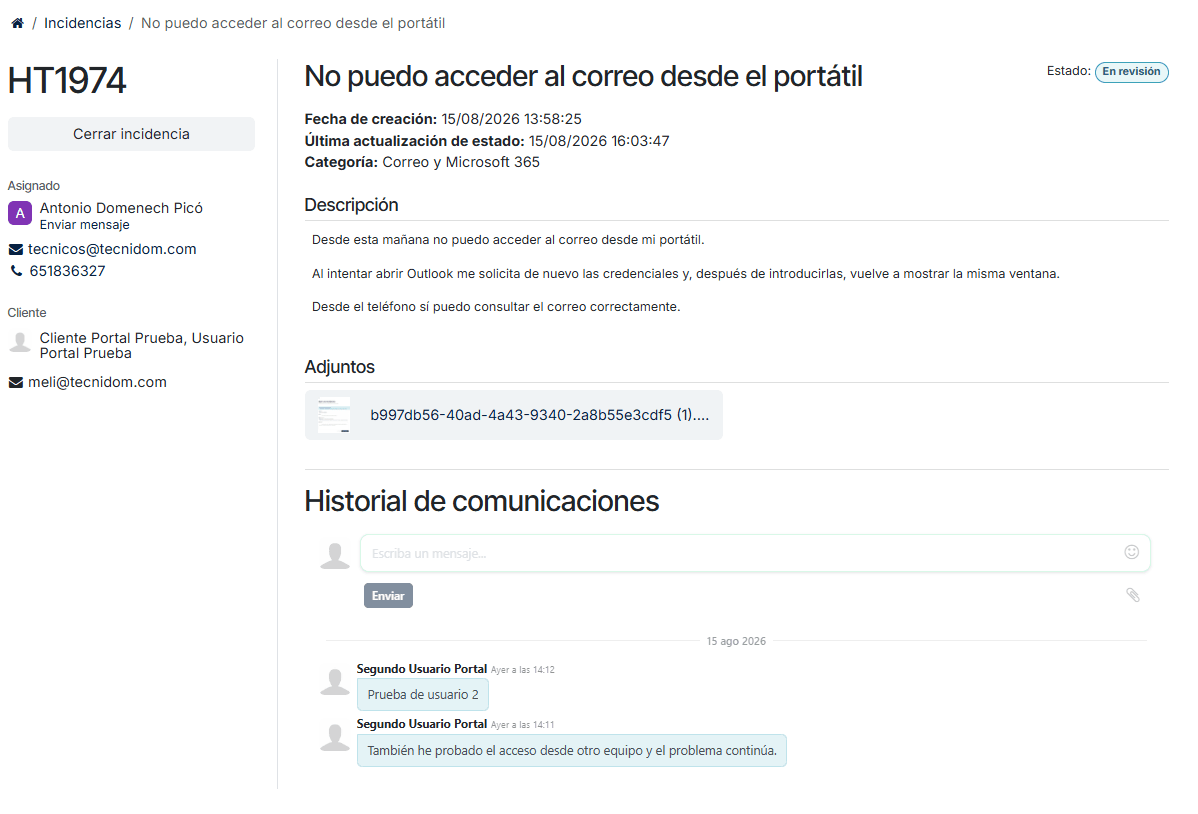
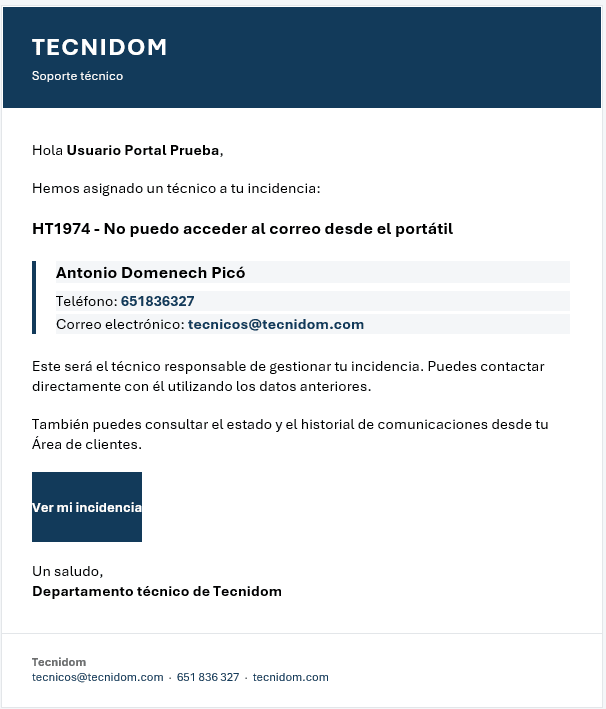
Customers receive updates without chasing the support team
Email notifications cover important milestones. Communications remain linked to the incident, and the customer can go directly to their Customer Area.
- Email notifications.
- Assignment and important change alerts.
- Direct access to tracking.
- History linked to the incident.
Greater oversight for service managers
Accumulated information helps measure the team's actual workload, identify bottlenecks and manage priorities, deadlines and service trends.
- Incidents by status.
- Workload per technician.
- Priorities and deadlines.
- Incident volumes and trends.
- Reports tailored to the project.
An incident can be the beginning, not the end
Where appropriate, incident management can connect with other parts of the service to avoid duplicate records and unnecessary manual work.
One technological foundation, many types of technical service
The solution adapts to businesses that receive service requests, assign work and need to keep customers informed throughout.
Maintenance companies
Requests, tasks, technicians, priorities, tracking and customer communications.
Technical support services
Structured incident management from opening through resolution and closure.
Installation businesses
Electrical work, telecommunications, doors, access systems and other installation and after-sales services.
Air conditioning and HVAC
Technical requests, equipment, priorities, follow-up and communication during the visit.
Alarms and security systems
Incidents, communications, owners and traceability of work performed.
IT, lift maintenance and other technical services
The structure is configured to match each company's types of requests, technicians and service levels.
Mamparas Palma: management and IT under one coordinated service
At Mamparas Palma, Tecnidom has implemented a business-specific management system tailored to its operations, including incident management and invoicing.
IT maintenance is also coordinated from Tarragona and, when work requires an on-site visit, Tecnidom works with an associated technical department that provides local support.
What the project can integrate
- A management solution tailored to the business.
- Structured incident management.
- Invoicing and related processes.
- Remote IT maintenance from Tecnidom.
- Coordinated on-site support when required.
The platform also adapts to your hosting preferences
The deployment model is defined according to each business's technical, control and operational needs.
In the cloud
Centralised access for users, technicians and customers from any authorised location.
On Tecnidom infrastructure
Tecnidom handles hosting, technical maintenance, backups, support and guidance.
On the customer's infrastructure
For businesses that prefer to host the solution on their own premises or infrastructure.
- Customisable statuses, categories and workflows
- Initial team training
- Support and guidance
- Documentation and user guide
We do not force your business to adapt to the software
We tailor the solution to the way your business works.
Statuses, categories, owners, permissions, communications, priorities and workflows are configured around how you actually operate. Technology should reduce workload, not add bureaucracy.
What matters before getting started
Is it the same standard solution for every business?
No. We start with a technology foundation and adapt statuses, categories, teams, priorities, permissions and workflows to each business's operations.
Is it only for IT companies?
No. It is intended for technical service and maintenance businesses in general: service centres, installers, HVAC, alarms, lifts, IT and other services that manage requests and incidents.
Can customers check the status of their incident?
Yes. In their Customer Area, they can check status, review history, see the assigned technician and add further information.
Are notifications sent?
Yes. The solution can send email notifications to keep customers informed throughout the process.
Can it be installed on our own premises?
Yes. Depending on the project, it can be deployed in the cloud, on Tecnidom-managed infrastructure or on the customer's own infrastructure.
Does it include training and documentation?
Deployment may include initial training, support, guidance, documentation and a user guide tailored to the solution delivered.
What happens if the platform or an automation fails?
The response depends on where it is hosted and what has been contracted. During deployment we define backups, maintenance, support and how technical incidents are handled. Important automations should include error logs and exception paths so that failures are not hidden.
Can we keep our existing providers?
Yes. The solution can coexist with existing suppliers and tools. Before deployment, we define responsibilities and integrations to avoid unclear boundaries between Tecnidom, the customer and third parties.
Is there a minimum term or a standard contract?
Terms depend on the deployment model, hosting, support and customisation. They are set out in the proposal before work starts; we do not assume the same contract fits every business.
What support is included after deployment?
Post-implementation support is defined in the proposal according to the project: technical maintenance, adjustments, guidance, hosting and ongoing development may be part of the service when contracted.
How do you currently manage an incident from opening to closure?
In an initial conversation, we review your current workflow. If appropriate, we then arrange a remote demonstration and prepare a proposal tailored to your team. Deployment can be carried out remotely across Spain, with on-site service in Tarragona and the Costa Daurada where it adds value.
tecnidom.com · info@tecnidom.com · 651 836 327