

Tecnidom Autonomy: management platform for technical service companies
Tecnidom Autonomy is a management platform for technical service businesses. It helps organise incidents and service visits, coordinate the team's work and keep the history of each case within one workflow.
The aim is not to replace people. It is to stop using them as a bridge between applications and reserve their time for customers, exceptions and decisions that require human judgement.
A modular platform for technical service businesses
Available: incident and service request management y custom automation to connect processes and applications.
In development: monitoring integration using Zabbix. Planned, not yet available: billing and customer portal.
The approach is to start with the modules your technical service business needs, then expand once each implementation has been validated.
Autonomy reduces repetitive work across people, departments and applications.
Information moves between systems without anyone having to copy, paste, forward or re-enter data manually. We analyse a process, connect information sources and automate steps that follow clear rules. When human judgement is required, the workflow pauses, requests approval and resumes afterwards.
Integration, automation and AI are not the same thing.
Sometimes connecting two systems is enough. Sometimes an entire sequence needs to run. Only some steps require artificial intelligence. We choose the smallest component that solves the problem.
Systems share information
CRM, ERP, email, forms, calendars, helpdesk and APIs exchange information without manual re-entry.
A sequence runs automatically
When an event occurs, rules are applied, data is consulted, actions are taken and a record is kept.
Used when interpretation is required
Classify text, summarise, extract intent or support decisions within defined limits. Not every process needs AI.
Your business already pays for inefficient processes. The cost is simply hidden in payroll.
This cost does not appear on an invoice labelled “unnecessary manual work”. It appears as hours spent by skilled employees copying information, sorting requests, checking data, chasing updates, correcting errors and moving work between systems or departments.
You pay twice for the same data
First to collect the data, then for someone to enter it again in the CRM, ERP, tickets, orders or inventory.
You pay for delays
The process stops until someone reads, interprets, classifies, checks or forwards the information.
You pay to correct mistakes
Duplicates, missing fields, incorrectly copied references and inconsistent information create extra work.
Costs rise as you grow
If the workload grows while the process stays manual, the need for additional structure grows at almost the same pace.
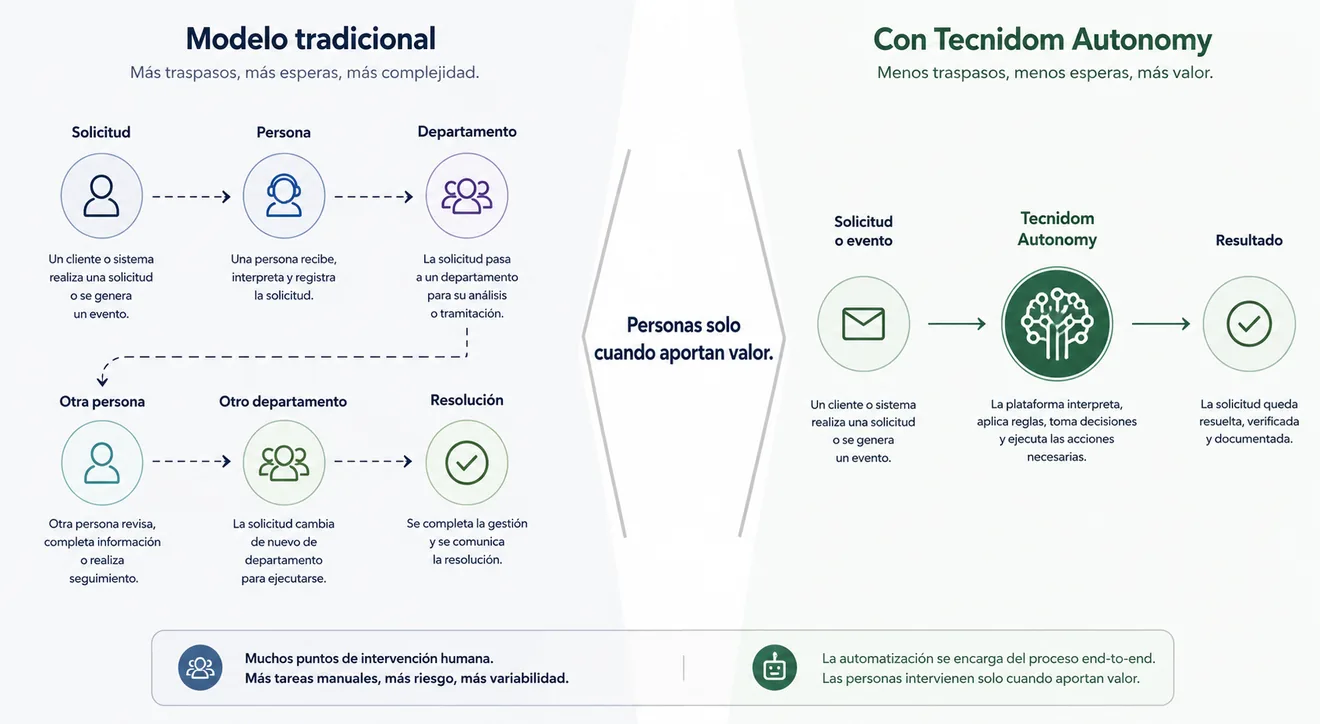
Put a number on one process. Then scale it across the business.
We are not asking you to believe a generic savings percentage. Enter your own figures. The discussion starts with what the process costs today and how much capacity automation might free up.
Now consider support, administration, sales, purchasing, maintenance and operations. The value is not in one big automation; it is in the hundreds of small manual interventions that become unnecessary.
Choose a process
Support, administration, orders, onboarding, incidents, email classification, maintenance…
Calculate its current cost
Monthly volume × minutes per operation × hourly cost.
Estimate what can be automated
The difference represents operating capacity that could be freed for higher-value work.
What happens if your customer base doubles tomorrow?
If doubling your business also doubles emails, tickets, administrative tasks, checks, coordination and staff, the organisation eventually becomes a barrier to growth.
Without automation
- More volume requires more human involvement.
- More people classifying, copying and coordinating.
- Higher fixed costs to support growth.
- More opportunities for errors.
- Business capacity is constrained by administrative capacity.
With autonomous processes
- The platform absorbs some of the increase in volume.
- The team focuses on exceptions, customers and decisions.
- Repetitive processes follow the same standard.
- Data moves without being re-entered.
- The organisation can grow more slowly than business volume.
From small repetitive tasks to complete self-running workflows.
Savings do not come from one “big automation”. They come from removing hundreds or thousands of small tasks that consume minutes over and over again.
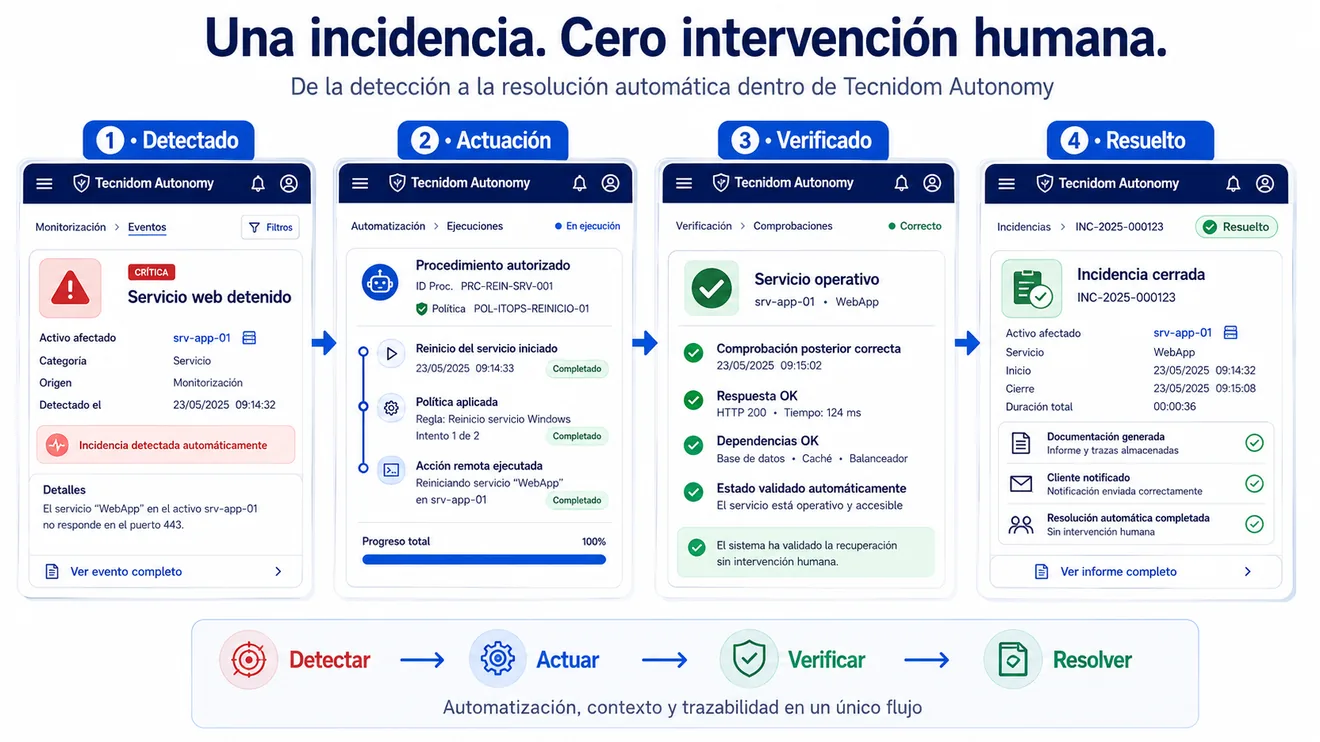
An incident may be resolved without manual intervention.
Detect, act, verify, close, document and notify. A process that used to require several manual steps can run from start to finish when authorised.
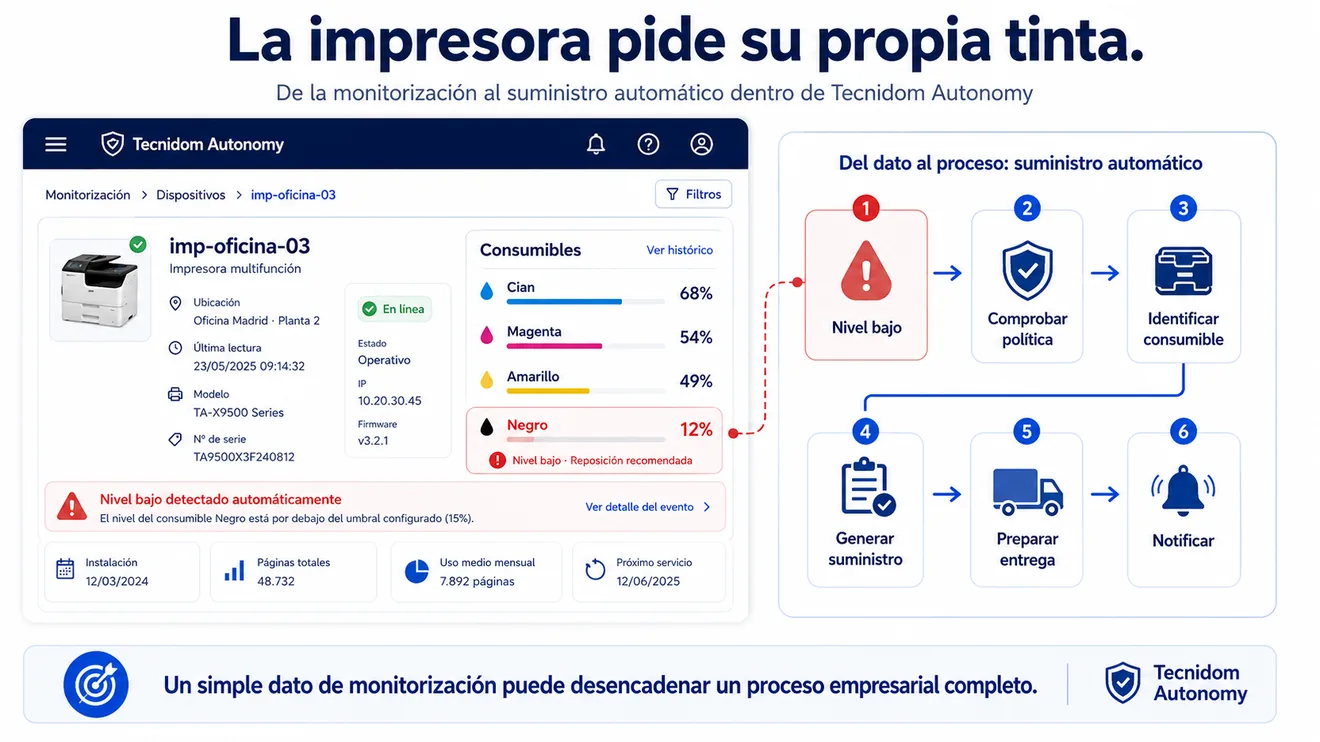
Example: a device detects a need and triggers the next step.
A low stock level can trigger a policy check, identify the consumable, generate a supply request, prepare delivery and send a notification—without entering the data again.
Every time someone re-enters data, there is another opportunity for error.
Most of these failures are not major disasters. They are small errors that cost money because someone has to review, correct, call, resend, redo or reconcile information between systems.
Automate, yes—but with rules, boundaries, context and traceability.
Once the economic benefit is clear, the next question is: can I entrust real business processes to it? The answer depends on how automation is governed.
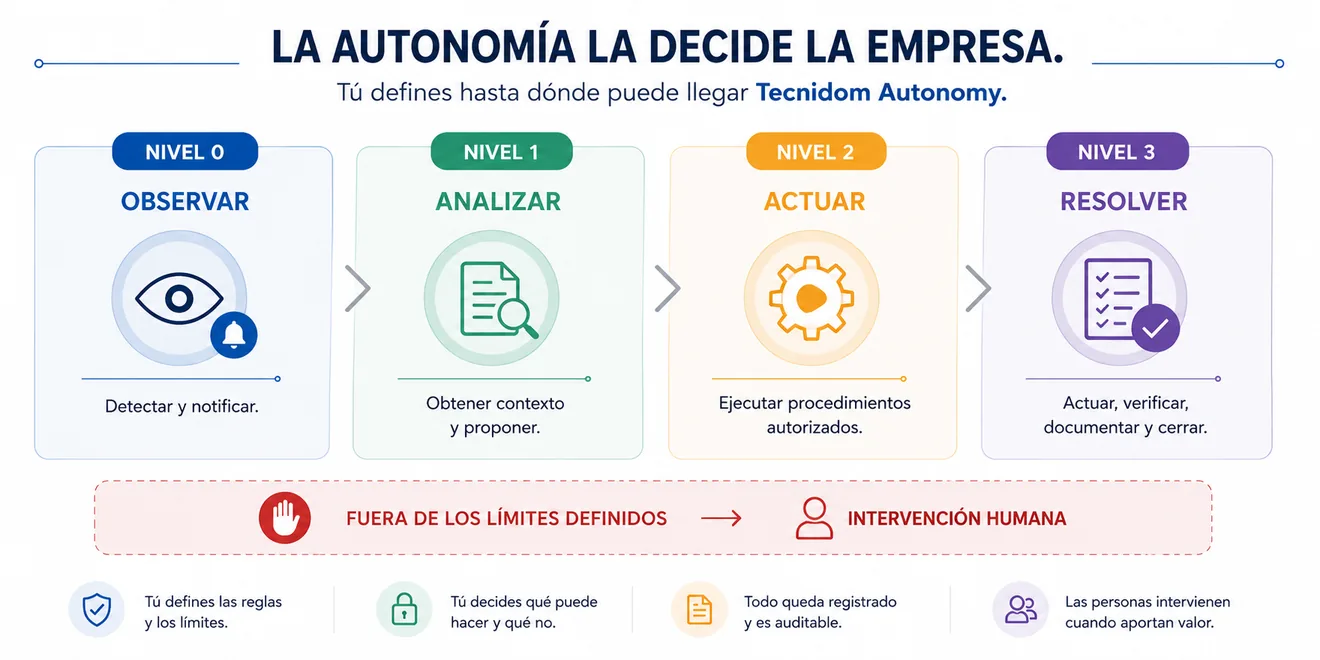
Levels of autonomy
Observe, analyse, act or resolve. Each customer, asset or process can have different limits.
Process orchestration
Tools such as n8n can coordinate inputs, AI, context, rules, actions and logging within the architecture.
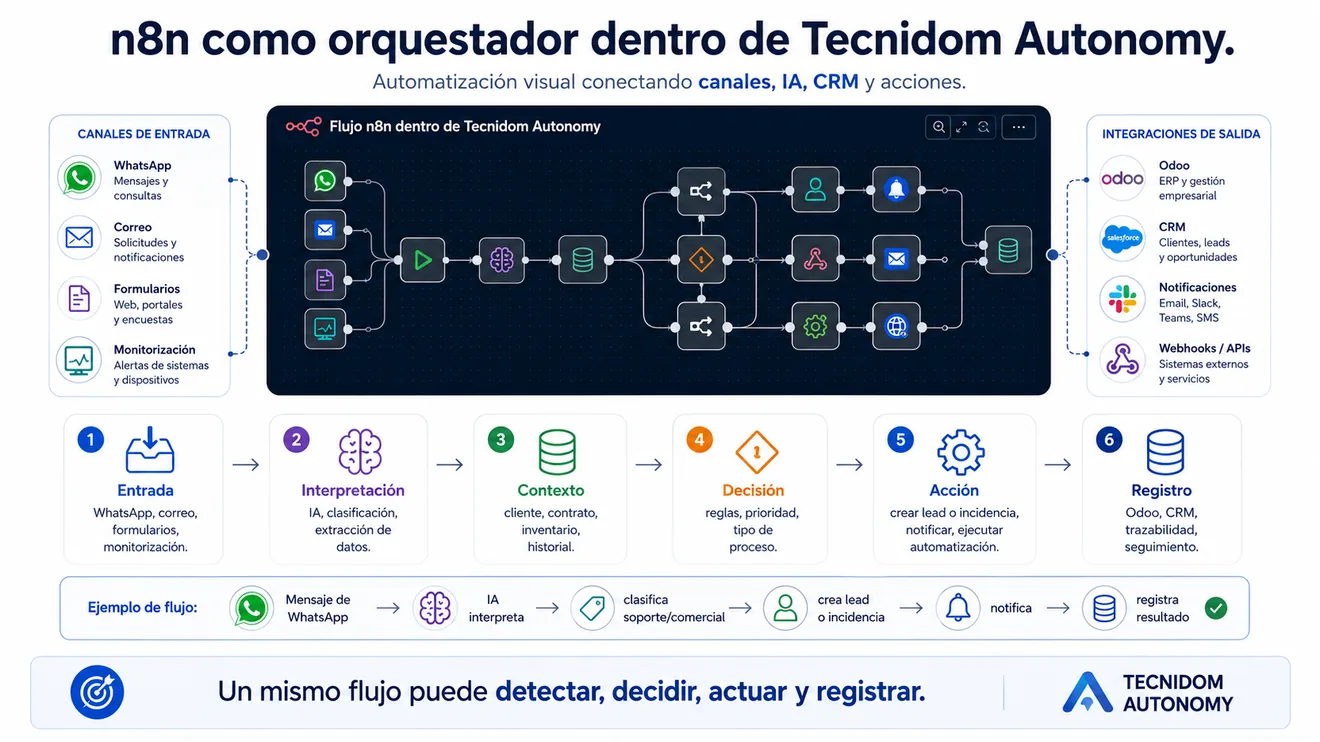
This is not another standalone tool. It is a way to decide which processes merit automation and how to govern them.
Once the need is clear, we can implement a specific automation. Autonomy also comes into play before and during implementation: it measures friction, dependencies, cost and risk to prioritise what should be connected, automated or left to human judgement.
The two capabilities complement each other: one handles the specific implementation, while the other provides analysis, prioritisation, boundaries and monitoring for larger processes.
Start with one process. Then decide whether to scale it.
We do not start by connecting the entire business. We choose a sufficiently repetitive, measurable process, define boundaries and validate the result before expanding.
Cloud hosting is optional. Data control is not.
Data, rules and critical decisions can remain within the trusted environment, on the customer's infrastructure or infrastructure managed by Tecnidom.
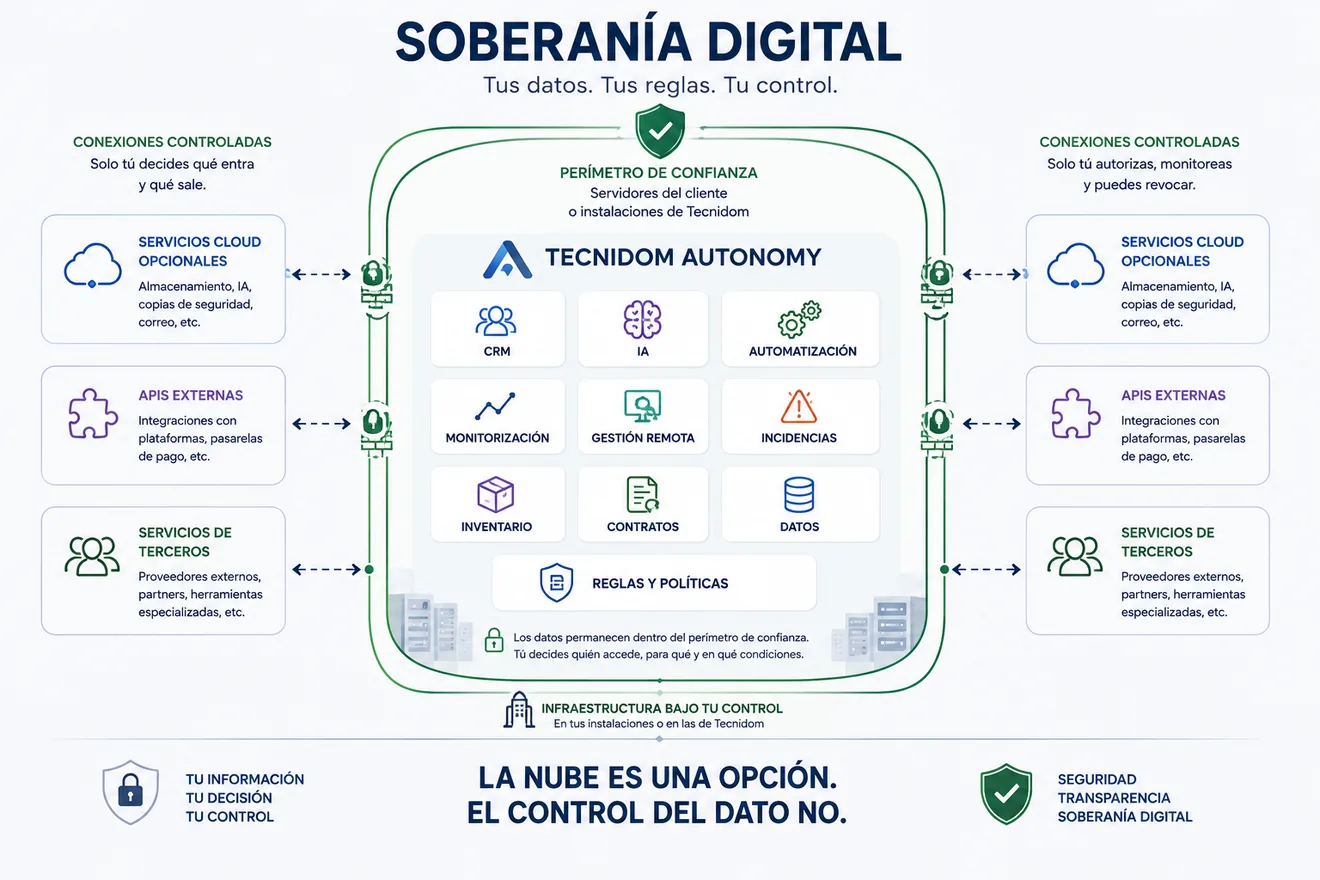
Cloud where it makes sense
External services and APIs can be used when they add value, always through controlled connections.
Control where it matters
You decide what information may leave, which processes may run and under what conditions.
We do not automate for automation's sake.
Automating a bad process still leaves you with a bad process—only faster. Before implementing anything, we check whether the volume, process stability and risk justify it.
Automation makes sense when…
- the task is repeated often enough;
- rules and exceptions can be defined;
- source data is reasonably reliable;
- manual cost or time can be measured;
- we can check the outcome and keep an audit trail.
We do not force automation when…
- the process changes constantly or is not yet defined;
- volumes are too low to justify the project;
- an irreversible decision requires human judgement;
- data quality does not allow safe action;
- automation would add more complexity than benefit.
Four terms used on this page.
What management often asks before getting started.
Do I have to change the software my company already uses?
Not necessarily. The first option is usually to integrate existing tools through APIs, webhooks, email or other available mechanisms. We only recommend replacing an application when its limitations make integration impractical or unsafe.
How long does implementation take?
It depends on the process and integrations. We prefer to start with a specific, bounded and measurable workflow, validate it and then expand. The initial phase is intended to estimate scope and effort before committing to a larger deployment.
What happens if an automation fails?
Important workflows are designed with logging, error handling and exception paths. Depending on the risk, an incident can be retried, the workflow stopped or the issue escalated to a person for review.
Does AI make decisions on its own?
Only within defined limits. AI can help classify, interpret or suggest, but sensitive actions may require deterministic rules or human approval.
Where is our data processed?
This is decided for each project. We can use customer infrastructure, Tecnidom-managed infrastructure or cloud services where they add value, defining what information may leave and under what conditions.
Are we tied into a long-term contract?
The model depends on the project and subsequent support. Scope, maintenance, external services and terms are defined before implementation. We do not propose indefinite dependence as a substitute for a clear technical proposal.
Is Autonomy already a finished product?
No. Tecnidom Autonomy is under development and being rolled out progressively within our services. We use it as a framework for designing governed automation and integrations adapted to each business and process.
Which repetitive process is consuming time every month?
The first step is not to automate everything. It is to identify where hours, handovers and errors are concentrated and start with the costliest processes. We can work with businesses across Spain, combining remote analysis with on-site service in Tarragona and the Costa Daurada where valuable.
Lower operating costs, greater capacity and an organisation that can grow more efficiently.
Governed automation, traceability, permissions, integration and control over data.
Fewer repetitive tasks, fewer delays and fewer errors caused by moving information manually.